January 2026 release
Overview
Major Upgrades highlighted here:
| Component | Current | Previous |
|---|---|---|
| e-label Management Tool | v1.21.0 | v1.20.4 |
| e-label SaaS Portal | v1.12.3 | v1.12.2 |
| QR manager | v1.15.0 | v1.14.1 |
Individual Component Change List
A more detailed list of the substantive changes affecting each component.
e-label Management Tool v1.21.0
Features:
-
Added a new e-label template.
-
Added “(01)” before the GTIN in the text displayed around the QR code.
-
Added an inactive code warning for all blacklisted code reasons.
-
Fixed an issue where the wine color in the Product Information section did not update after being changed in the Consumption Unit.
-
Fixed a UI issue that occurred when the SKU was too long.
Updates to E-label template:
Expanded Units & Customization
The scope of product data has been expanded to support more categories and provide greater control over how information is presented.
-
New Measurement Units: Support for ml, cl, L, g, and kg has been added to accommodate various product types.
-
Translatable Custom Fields: Within the Editor, you can now add custom labels and values. These are fully translatable, ensuring your product data is localized for every market.
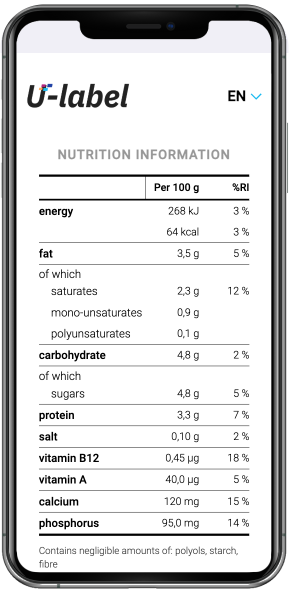
Nutrition Declaration (EU Standards)
Displaying nutritional information is now more precise and compliant with European food and beverage requirements:
-
Standardized Tables: Implementation of the official European nutrition information table format.
-
Reference Intake (RI) Toggle: A new landing page toggle allows you to display RI values. When enabled, the mandatory disclaimer “%RI: Reference intake of an average adult (8400 kJ/2000 kcal)” will automatically appear.
-
Vitamins & Minerals: Added support for Vitamins & Minerals in the nutrition declaration.
Enhanced "Free Section" in Editor
The Free Section has been upgraded to allow more region-specific content.
e-label Saas Portal v1.12.3
Features:
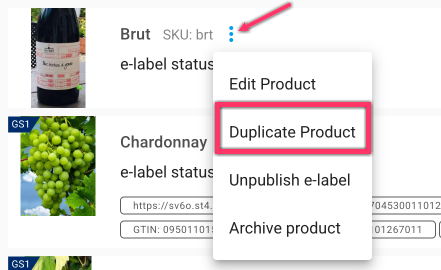
- Added the ability to duplicate a product including its e-label data.
-
Added “(01)” before the GTIN in the text displayed around the QR code.
-
Fixed a UI issue that occurred when the SKU was too long.
-
Fixed an issue when changing the first and last names to longer values.
QR manager v1.15.0
Features
-
Added the ability to duplicate a product including its e-label data.
-
Added “(01)” before the GTIN in the text displayed around the QR code.
-
Updated the Excel bulk upload template:
-
Added a new template.
-
Added missing translation fields for all templates (product_origin_expression, responsible_consumption_message, recyclability_message, organic_message, certifications_message).
-
Added missing fields from the Product Information section (product_type, production_method, wine_colour, traditional_terms).
-
Updated the Tutorial sheet to reflect all these changes.
-
-
Fixed a UI issue that occurred when the SKU was too long.
-
Updated translations.